




"No valid mirror found"?
- Login o registrati per inviare commenti

Am trying to upgrade Trisquel 11 to Trisquel 12, but keep getting message "No valid mirror found" As is suggested on the attached screenshot, can I let it rewrite the 'sources.list' file, which would update all 'aramo' to 'ecne' entries? Or should I do something else? Thanks in advance for answers!
| Allegato | Dimensione |
|---|---|
| Screenshot at 2026-04-22 20-59-30.png | 158.32 KB |


I would "Download from" another server in "Software & Updates".
Thank you, Magic Banana, it suggested a mirror in the country where I am, which worked.
Later it wanted to upgrade grub-pc (had not seen this before), gave three options. Did not see a 'back' button, maybe could have closed this window? Checked all, later gave warning that one of those failed, that if I proceeded it might not boot properly afterwards. Proceeded anyway, right after the computer restarted saw the Trisquel 12 picture once briefly, after that the computer seems to cycle, but Trisquel 12 does not boot on this Dell Inspiron 3558, don't see it among boot options in the bios.
Am writing this from it using a bootable USB with Trisquel 11 Abrowser 126 on it.
Can this be fixed so that Trisquel 12 will boot? If yes, how? Or am I better off making a bootable USB with Trisquel 12 on it and installing that? I guess if I install Trisquel 11 from the bootable USB I'm using right now, and after updating then try to upgrade to Trisquel 12 I'd encounter the same as described above, and if I make the wrong choices result would be the same.
Would prefer to try to fix it in order to learn, so any answers are appreciated, thank you!
In the past had Trisquel 9 not boot, through help via the Trisquel and FSF forums managed to get it to boot again eventually. Could reinstalling GRUB like Magic Banana suggested help with this Trisquel 12 issue now?
https://trisquel.info/en/forum/trisquel-9-seems-be-gone-after-bios-update
Would I go about it with the same commands, or is it different for Trisquel 12? Thanks in advance for answers!
Later it wanted to upgrade grub-pc (had not seen this before), gave three options.
Wasn't the message actually about its simple configuration, in /etc/default/grub? If you had modified that file (to display GRUB's menu or to change the timeout before booting the default entry or to add a kernel option or...), it is normal that the upgrade asks you whether to your configuration file should be kept, or if you adopt that of the maintainer of the package, or a mix of the two files. You can take a look at that file (and possibly copy it in reply to this post) from a live system, after mounting the root partition of the installed system (/etc/default/grub in the live system is the file for the live system).
Could reinstalling GRUB like Magic Banana suggested help with this Trisquel 12 issue now?
It is funny that you refer to that 3.5-year-old post when I actually pointed to the same instructions in my last post: https://trisquel.info/forum/do-release-upgrade-stopped-lock-files#comment-183094
I am foiled. Now everybody knows I am a fraud. I know almost know nothing. I have been repeating over and over again the little I know for the past 16 years.
To actually answer your question: yes, that may be a solution.
@Magic Banana "I have been repeating over and over again the little I know for the past 16 years." What and that you share is very much appreciated!!! For not-good-with-tech people like me your sharing/repeating matters, because it helps me along to keep using libre Trisquel.
I should have asked for help when the upgrade became unfamiliar, but it was very late at night. Using the live system, found the home folder in Caja under 'Devices', everything's there.
See attached screenshot of sudo fdisk -l I'm not sure where the installed Trisquel 12 is. Am trying to wrap my head around "You can take a look at that file (and possibly copy it in reply to this post) from a live system, after mounting the root partition of the installed system (/etc/default/grub in the live system is the file for the live system)." In "File system" of the live system I see a grub file in etc/default/grub But I don't know how to mount the root partition of the installed system. Sorry, I don't even seem to understand the basics :-/
Will be away for some hours later, back in evening. Want to try to work through this, not give up. Since I saw the Trisquel 12 picture once very briefly after the computer restarted I assume that it upgraded to Trisquel 12, hopefully it's "just" a matter of getting it to boot. I think one of the five or so lines that appear very briefly on the black screen before it goes out and comes back on again says something about 'video', but it's so short I can't read that fast.
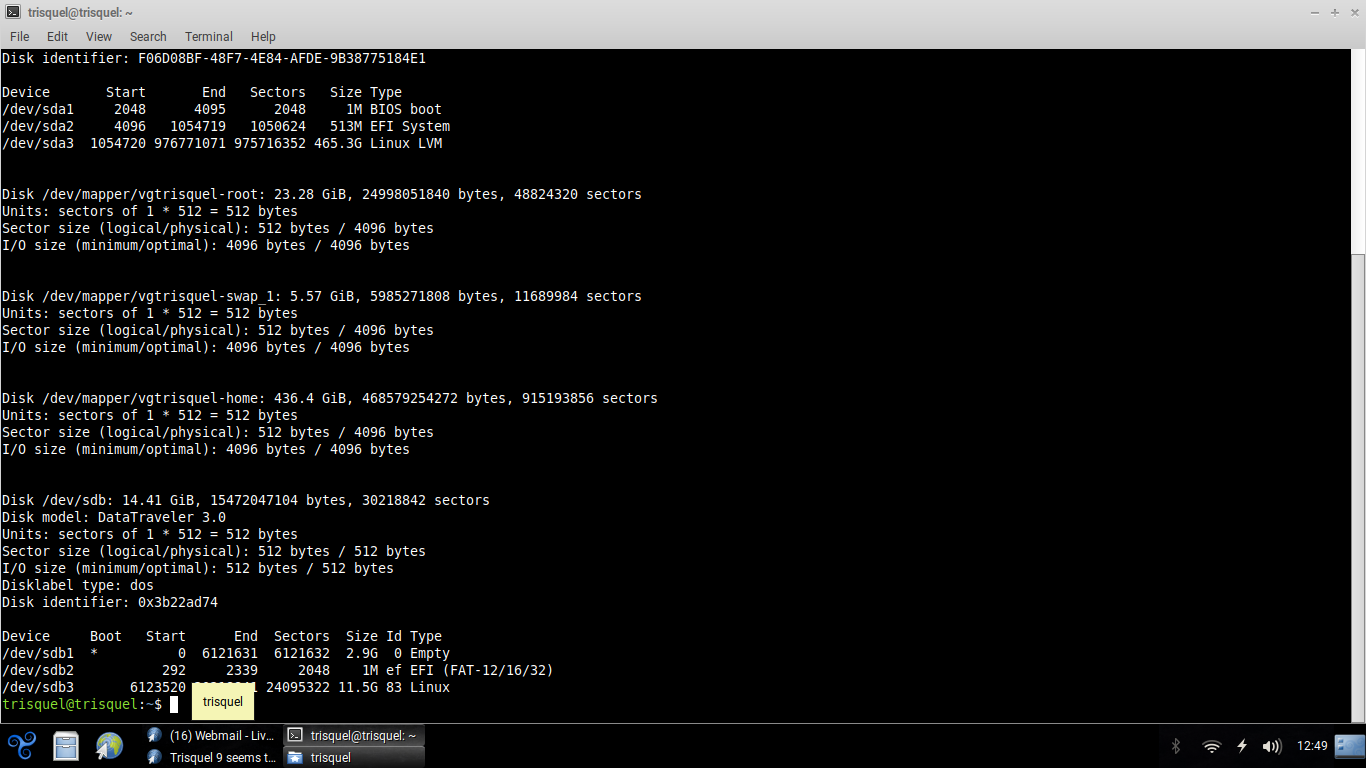
I'm not sure where the installed Trisquel 12 is.
It is on the physical partition /dev/sda3. I specify "physical" because you actually use LVM, certainly for encryption. https://fabianjost.com/mount-encrypted-linux-system-from-live-disk/ may be the instructions your are searching for.
That's an interesting informative article. I don't think that my installation of Trisquel is encrypted, haven't entered password to encrypt/decrypt. But now that you mention LVM, remember that when installing Trisquel 11 on this Dell Inspiron 15 3558 it suggested to use LVM (Logical Volume Manager, I think). Good to know that even if it was encrypted it could be fixed, had wondered about that.
Haven't tried to fix the not-booting properly issue yet because I don't want to possibly make things worse.
Haven't been able to mount sda3. sudo mount /dev/sda3 /mnt gives mount: /mnt: unknown filesystem type 'LVM2_member'. dmesg(1) may have more information after failed mount system call. (see screenshot of gparted)

Looking through your instructions again at
https://trisquel.info/en/forum/trisquel-9-seems-be-gone-after-bios-update#comment-167373
on the Dell EFI seems to be in sda2:
$ sudo mount /dev/sda2 /mnt
$ sudo ls /mnt ---> EFI
$ sudo ls /mnt/EFI ---> BOOT trisquel
This EFI seems to contain only the BOOT trisquel, nothing else is listed.
Would it be easier to fix if LVM was not involved? Why can't I mount sda3? Tried mounting /dev/mapper/vgtrisquel-home. Need to go to bed now, will keep working on it another time.